Top 5 Smart Thermostats for High End Residential & Multifamily (2026 Edition)
Independent Review • Updated for 2026 • Luxury & BAS-Ready Options
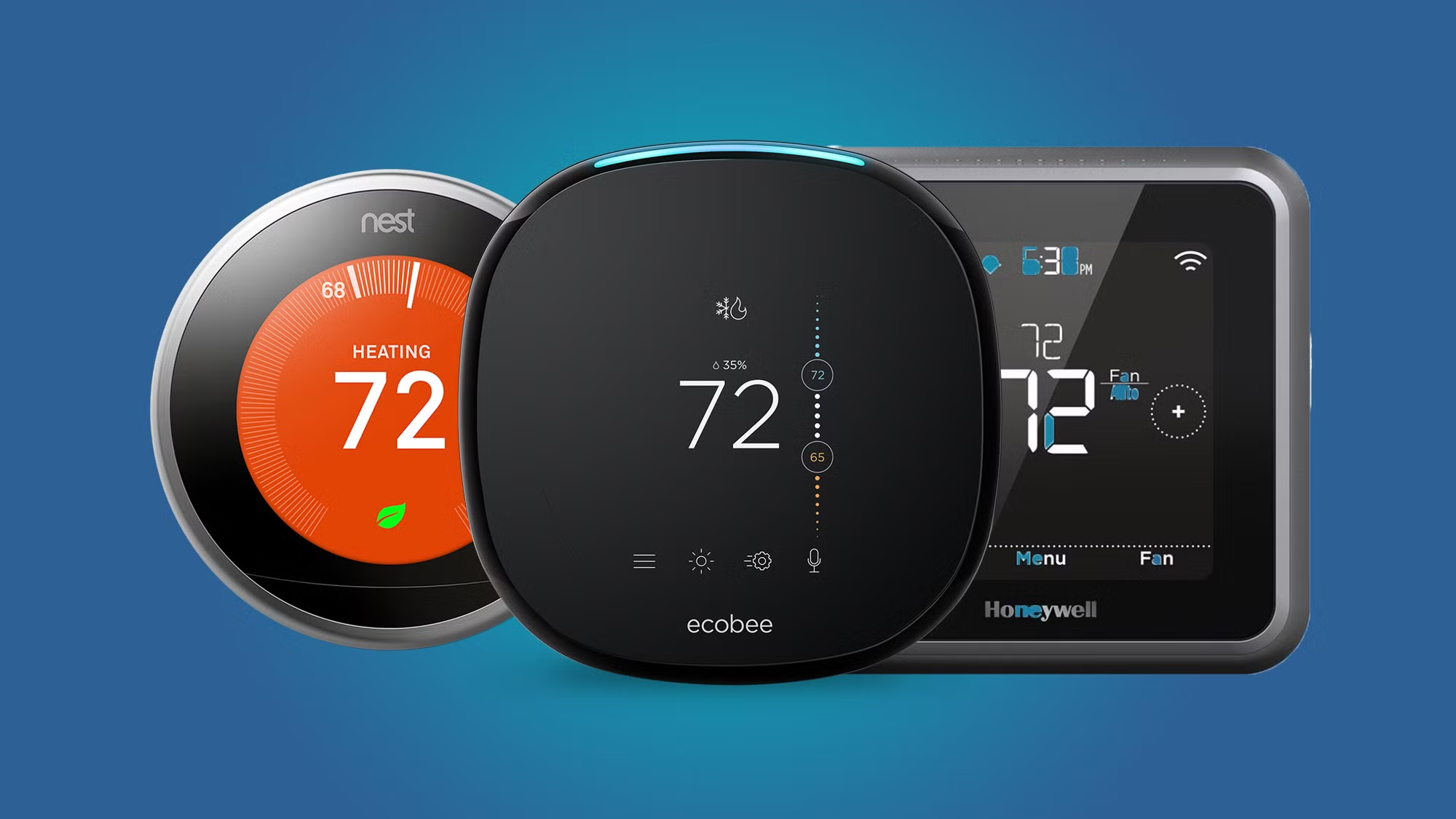
High-end homes and multifamily developments demand more from a thermostat than basic temperature control. Today’s smart thermostats blend voice-enabled convenience, integration with whole-home systems, and even indoor air quality (IAQ) monitoring to deliver comfort and efficiency in luxury residences and upscale apartments. This 2026 guide ranks the Top 5 Smart Thermostats suited for high-end residential and multifamily applications, using transparent 60-point scoring across 6 categories. We compare off-the-shelf favorites (ecobee, Nest, Honeywell) with professional-grade thermostats (Control4, Crestron) that interface with building automation systems (BAS) and custom smart home platforms.
Integration priorities in this sector include Wi-Fi cloud control, voice assistant compatibility (Alexa, Google, Siri/HomeKit), and interoperability with broader smart home ecosystems (lighting, shades, security). The best systems embrace open standards like Matter, as well as protocols like Z-Wave, Zigbee, KNX, or BACnet for seamless interoperability – though some luxury models may require proprietary hubs or gateways. Performance and IAQ features are also critical: we evaluate built-in sensors (for temperature, humidity, CO₂/VOC), support for zoning and remote sensors, adaptive scheduling algorithms, and how each thermostat handles advanced HVAC scenarios (multi-stage systems, heat pumps with auxiliary heat, radiant floors, or 3-speed fan-coil units).
📊 Smart Climate Control Facts & Trends (2025)
- HVAC Energy Savings: Heating/cooling can account for ~50% of home energy use, and smart thermostats typically save 10–15% annually on HVAC costsintelmarketresearch.com. Many models use AI-driven schedules and occupancy sensing to trim waste without sacrificing comfort.
- Utility Rebates: Over 80 North American utilities now offer rebates (around $75–$100 each) to encourage installing smart thermostatsintelmarketresearch.com – recognizing their role in peak demand reduction.
- Adoption & Growth: Nearly 47% of U.S. households have a smart thermostat as of 2025utilitydive.com, a number climbing quickly in luxury markets. The U.S. smart thermostat market reached ~$2.3B in 2024 and is growing ~17% annuallygrandviewresearch.com as high-end consumers prioritize energy efficiency and connectivity.
- Interoperability Rising: The 2022 launch of the Matter standard has greatly improved cross-brand compatibility in smart homesintelmarketresearch.com. The newest devices (e.g. Nest 4th Gen) now support Matter natively, enabling out-of-the-box integration with Apple Home and otherstheverge.com.
- IAQ Awareness: Post-2020, homeowners are more air-quality conscious. Premium thermostats like ecobee now include built-in IAQ sensors (for VOCs/CO₂) and will alert you if indoor air quality dipsindoortemp.com, helping trigger ventilation or filtration for healthier living spaces.
🧠 Scoring Categories (1–10 points each, 60 total):
- Integration & Interoperability: Support for Wi-Fi/cloud control, voice assistants, open APIs or open standards (Matter, etc.), and ability to tie into BMS or smart home hubs.
- HVAC Control Capabilities: Support for advanced HVAC configurations – multi-stage conventional or heat pump systems, auxiliary heat, zoning, radiant floors, fan coils, humidity control, etc. Also adaptive “learning” or optimization features for efficiency.
- IAQ Features & Sensors: Onboard sensors for temperature, humidity, occupancy/motion, plus any air quality monitoring (CO₂, VOC). Ability to control humidifiers, dehumidifiers, or ventilators for indoor air quality.
- User Interface & App Experience: Quality of the physical interface (touchscreen, dial, display) and the mobile/web app. Ease of use, clarity of info (e.g. weather, schedules, energy reports) and user profile scheduling.
- Installation & Expandability: Ease of installation or retrofit (e.g. power options if no C-wire), support for external sensors or multiple zones, and expandability to integrate new components or updates (e.g. adding wireless room sensors, compatibility with future systems).
- Value for Residential/MF Use: Price-to-performance ratio given the feature set. Includes energy savings potential, aesthetic design (important in luxury settings), build quality, and expected lifespan/support. (A high score indicates a worthwhile long-term investment for upscale homes or developments.)
Below is the 2026 ranking of the Top 5 smart thermostats that excel across these criteria, with total scores out of 60. Each profile includes a score breakdown, key specs, pros/cons, and ideal use cases – whether you’re a luxury home builder, an MEP design engineer, or a multifamily property manager.
🥇 Top 5 Smart Thermostats (2026 Ranking Summary)
| Rank | Thermostat & Model | Score (60) | Best For |
| #1 | ecobee SmartThermostat Premium | 56/60 | Best Overall for Smart Homes & IAQ – full-featured integration and air quality monitoring |
| #2 | Honeywell Home T10 Pro Smart | 52/60 | Best HVAC & IAQ Control – multi-stage systems, humidifiers/ventilation, pro installs |
| #3 | Crestron Horizon® Thermostat | 50/60 | Best Luxury Integration (Crestron) – custom homes with Crestron automation |
| #4 | Google Nest Learning Thermostat (4th Gen) | 48/60 | Best Learning & Design – adaptive scheduling and iconic design for high-end condos |
| #5 | Control4 Wireless Thermostat (Aprilaire) | 45/60 | Best for Custom Control4 Systems – seamless climate control in fully integrated homes |
🥇 #1: ecobee SmartThermostat Premium – Best Overall for Smart Homes & IAQ
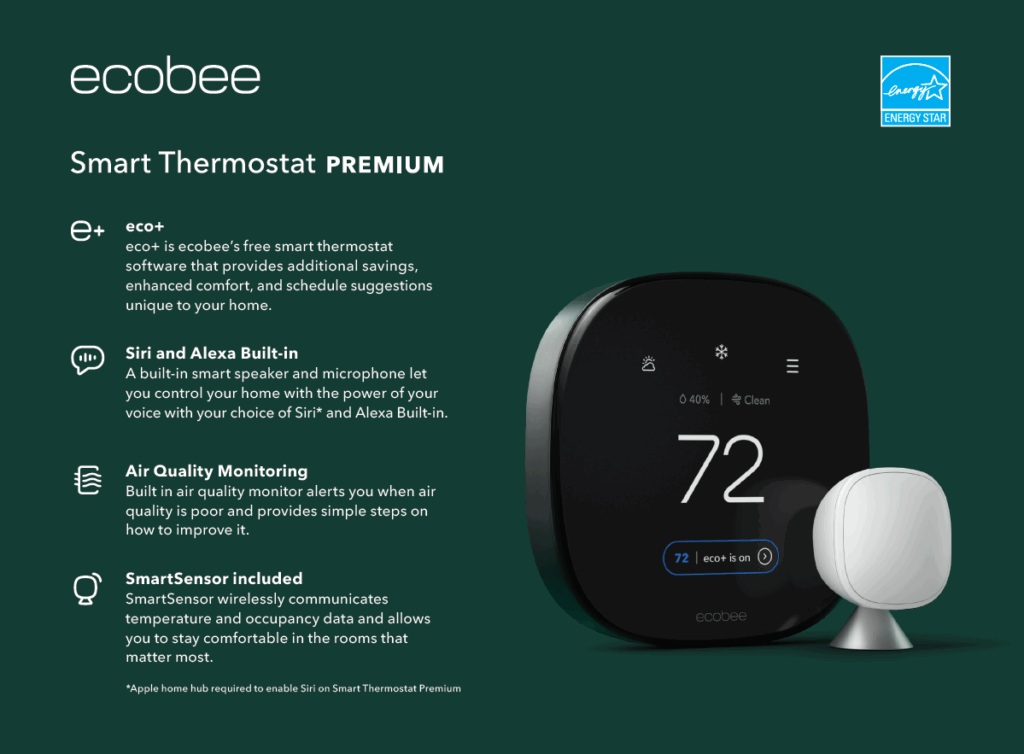
Score: 56/60 | Ideal For: Upscale single-family homes, condos, and light-commercial apartments wanting maximum smart home integration and air quality features.
⭐ Overview:
The ecobee SmartThermostat Premium earns the top spot with its unmatched blend of smart integration, sensors, and AI features. This thermostat not only handles complex HVAC schedules with ease – it also serves as a voice assistant hub and air quality monitor. The Premium model comes with a stylish glass finish and a large touchscreen, and it’s one of the few with built-in Alexa and Siri functionality (the device can double as an Alexa smart speaker out of the box)indoortemp.com. Ecobee’s Eco+ software uses occupancy sensing and AI to optimize comfort versus energy use, automatically learning schedules and even suggesting tweaks for efficiency. For high-end homes, ecobee checks every box: it ties in with virtually all major platforms (Alexa, Google Assistant, Apple HomeKit, SmartThings, IFTTT and more) and now includes Thread radios for upcoming Matter support. With its indoor air quality sensor and alerts, the ecobee Premium actively monitors your environment – notifying you if VOC or CO₂ levels rise and suggesting ventilation remediesecobee.comecobee.com. It’s a forward-looking, future-proof choice that delivers comfort, energy savings, and peace of mind on IAQ.
🔧 Key Specs:
- HVAC Compatibility: 2H/2C conventional or 4H/2C heat pump + 2 aux heat; supports accessories (humidifier, dehumidifier, ventilator) via ACC terminalsjacksonsystems.com. Heat pump dual-fuel and aux lockout supported (configurable balance points).
- Built-in Sensors: Temperature, humidity, proximity (occupancy via built-in radar), ambient light; Air Quality (VOC/eCO₂) sensor alerts to poor IAQindoortemp.com. Includes one wireless SmartSensor (remote room sensor with occupancy and temp).
- Connectivity: Wi-Fi 5 (2.4/5 GHz); built-in Alexa and ** Siri** (microphone and speaker on unit)indoortemp.com; Bluetooth for sensor pairing; 915MHz Thread for future Matter/Smart home.
- Integrations: Works with Amazon Alexa (built-in), Apple HomeKit, Google Assistant, SmartThings, and supports a robust open API for custom integrationsindoortemp.com. Matter support expected via software update (Thread radio on-board).
- Power & Installation: Hardwired (C-wire) or Power Extender Kit (included) for systems without C-wire. Retrofit-friendly plate included. Supports 24VAC systems; no battery needed (memory retention for outages).
🧪 Scoring Breakdown:
- Integration & Interoperability: 10/10 – Industry-leading. Wi-Fi cloud control plus native Alexa and Siri, Google compatibility, HomeKit, and an open API.indoortemp.comindoortemp.com Few, if any, platforms are off-limits, and Matter-readiness adds future-proof interoperability.
- HVAC Control Capabilities: 9/10 – Supports virtually all typical residential HVAC setups (multistage, heat pumps, dual fuel) and controls for humidifiers, HRVs/ERVs, etc. Lacks only specialized commercial features (e.g. 3-speed fan coil) which aren’t common in homes.
- IAQ Features & Sensors: 10/10 – Outstanding. Onboard temp/humidity and air quality monitoring (VOC/CO₂) with alertsindoortemp.com. Can control humidification, dehumidification, and ventilation systems for whole-home IAQ. Occupancy detection via SmartSensor for “smart away” energy saving.
- User Interface & App Experience: 9/10 – Big, bright touchscreen with weather and air quality info on display; far-field voice control (Alexa/Siri). The ecobee app offers full remote control, scheduling, energy reports, and intuitive setup. (App is very robust, though slightly less “polished” visually than Nest’s.)
- Installation & Expandability: 9/10 – Flexible power options (comes with adapter if no C-wire). Pairs with up to 32 remote sensors for zoning/averaging. Supports Apple Watch and many third-party integrations. Only minor install caveat: wall unit is larger than some (may cover paint outline easily with included plate).
- Value for Residential/MF Use: 9/10 – At ~$250 retail, it’s a premium price but delivers premium value: energy savings up to 26% (per Ecobee) and numerous features homeowners would otherwise need separate devices forecobee.comecobee.com. The design and feature set meet luxury expectations, and ongoing software updates extend its lifespan.
👍 Pros:
- All-in-One Functionality: Thermostat + Alexa/Siri smart speaker + IAQ monitor in oneindoortemp.com. Reduces gadget clutter in luxury spaces.
- Wide Ecosystem Support: Works with practically everything (Alexa, Google, HomeKit, SmartThings, IFTTT), making it an easy fit for any smart home setupindoortemp.com.
- Remote Room Sensors: Included SmartSensor helps eliminate hot/cold spots by averaging or prioritizing rooms; great for multi-level homes. Occupancy sensing in sensors enables smart away/home adjustments.
- Energy Savings & Insights: Eco+ AI features auto-adjust schedules for savings, time-of-use optimization, and provides handy monthly efficiency reports. ENERGY STAR® certified and utility rebate eligible.
- Sleek Design & Interface: High-resolution glass touchscreen looks at home in modern luxury interiors. Displays weather, humidity, even local air quality index. Touch and voice controls are user-friendly.
👎 Cons:
- Reliance on Cloud: Requires cloud connectivity for voice assistants and some features; local API control is limited (though HomeKit allows some local control). An internet outage means losing app/voice control temporarily (schedule will still run).
- No Native Z-Wave/KNX: Integrates well via cloud or Matter, but it doesn’t natively join Z-Wave or KNX networks. (Most users won’t need this—integrators can tie it into such systems via controllers or Home Assistant if needed.)
- Upfront Cost: Higher initial cost than basic thermostats, and to fully utilize (e.g. multiple room sensors, or the optional SmartSecurity features like occupancy alarms) you might invest in extra sensors or subscriptions.
- Audio Privacy Consideration: Having Alexa/Siri microphone on the thermostat could be a minor concern for privacy-conscious clients (microphone can be muted in settings).
🏁 Bottom Line:
The ecobee SmartThermostat Premium is the flagship choice for 2026 – perfectly balancing the needs of a high-end residence. It’s an ideal pick for homeowners or developers who want a thermostat that integrates with everything, saves energy intelligently, and even actively manages comfort and air quality. From a single-family retrofit to a new luxury condo, ecobee Premium brings adaptive intelligence and broad compatibility in a very stylish package. It’s hard to go wrong with this as the climate control center of a smart home.
🥈 #2: Honeywell Home T10 Pro Smart Thermostat – Best HVAC & IAQ Control
Score: 52/60 | Ideal For: Large homes or upscale apartments with complex HVAC (multi-stage AC/furnace or heat pump systems, whole-home humidifiers/dehumidifiers) and professional installations; also great for Lutron or Alarm.com integrations.
⭐ Overview:
Honeywell’s T10 Pro Smart Thermostat (Resideo THX321WFS series) earns the runner-up spot by excelling in areas critical for mechanical performance and indoor air quality control. This pro-grade thermostat is designed with HVAC contractors in mind, offering out-of-the-box support for advanced equipment configurations that many consumer thermostats can’t handle. Need to manage a 3-stage variable speed furnace, 2-stage compressor, plus an external dehumidifier and ventilator? The T10 can do that all at oncejacksonsystems.com. It even comes with a remote wireless sensor (Honeywell RedLINK 3.0) that detects temperature, humidity and motion in secondary roomsjacksonsystems.com – enabling multi-room comfort control and occupancy-based energy saving similar to ecobee. Integration is another strong suit: the T10 is Alexa, Google Assistant, and Apple HomeKit compatible for voice/app controljacksonsystems.com. It doesn’t have a built-in voice assistant, but it links seamlessly with smart home systems; notably, it’s one of the few pro thermostats that can show up in the Apple Home app (HomeKit support). The T10’s design is clean and modern (full-color touchscreen), and it ties into the Honeywell Home app for remote access, scheduling, and alerts. For high-end residential use, the T10 offers rock-solid reliability and broad compatibility – it speaks both Wi-Fi (for cloud and app control) and Resideo’s RedLINK (for sensor and accessory comms), and it’s backed by Honeywell’s long history in HVAC control. Overall, it’s a feature-packed thermostat that gives professionals and end-users a great balance of brains and brawn in managing indoor climate.
🔧 Key Specs:
- HVAC Compatibility: Up to 3H/2C heat pump or 2H/2C conventional systemsjacksonsystems.com (supports modulating furnaces with auxiliary heat). Controls HVAC fan, and has terminals to control humidifier, dehumidifier, or ventilation equipment directlyjacksonsystems.com. Outdoor temperature sensor input (wired) or pulls Internet weather for balance control.
- Sensors & Accessories: Comes with one wireless RedLINK 3.0 Room Sensor (battery-powered) that measures temperature, humidity, and motion/occupancyjacksonsystems.com. Supports up to 20 wireless sensors per thermostat for whole-home averaging and occupancy detectionjacksonsystems.com. Built-in thermostat sensors: temperature, humidity, proximity (for wake display).
- Connectivity: Dual-band Wi-Fi (2.4/5 GHz); Honeywell Resideo cloud for app; Apple HomeKit certified (local HomeKit API support), works with Amazon Alexa & Google Assistant voice controljacksonsystems.com. Integrates with platforms like SmartThings and Lutron (via cloud-to-cloud). Uses proprietary RedLINK wireless for sensor and optional wireless outdoor sensor (range ~200 ft).
- User Interface: 3.7″ color touchscreen LCD with easy scheduling UI and multi-room display. Simple menu for technicians (for advanced settings like dual-fuel lockout temps). Honeywell Home app (Resideo app) for remote access, geofencing, and alerts (filter reminders, extreme temps, etc.).
- Installation: Requires C-wire (24VAC) for power. Standard 6-8 wire hookup for advanced HVAC. Professional install recommended for multi-component setups. Can use an optional EIM (Equipment Interface Module) if needed, but usually wiring directly. Adapts to various junction box mounts with included UWP mounting system.
🧪 Scoring Breakdown:
- Integration & Interoperability: 9/10 – Excellent. Works with all three major voice ecosystems (Alexa, Google, HomeKit) for app/voice controljacksonsystems.com, which is relatively rare in pro thermostats. Open API isn’t officially public, but HomeKit and Alexa/Google integration cover most needs. No native Matter yet; however, its broad platform support and Alarm.com or Lutron integration options make it very versatile for high-end installs.
- HVAC Control Capabilities: 10/10 – Best-in-class. Handles up to 3-stage heat/2-stage cool systems, heat pumps with aux, and directly controls humidification, dehumidification, and ventilation systemsjacksonsystems.com. Few smart thermostats rival its HVAC I/O breadth – you can manage an entire home’s climate equipment with one unit. Also offers advanced features like dual-fuel auto changeover with outdoor temperature reads.
- IAQ Features & Sensors: 8/10 – Strong. Built-in humidistat and support for full IAQ equipment control (humidifiers, ERVs/HRVs). The included wireless sensors report humidity in different roomsamazon.com, enabling humidity averaging or just monitoring. No built-in VOC/CO₂ sensors, but that’s uncommon except in ecobee. It does provide filter change alerts and can run fan circulation routines to even out temperatures.
- User Interface & App Experience: 8/10 – The touchscreen is responsive and installer-friendly, though the UI aesthetic is utilitarian (not as sleek as Nest). The Resideo mobile app is fully functional with scheduling, geofencing (auto home/away), and multi-thermostat management for properties. Some users find the app a bit clunky, but it’s improved over time. HomeKit users can alternatively control it via Apple’s Home app, which is a plus for certain clients.
- Installation & Expandability: 9/10 – Very installer-friendly: standardized mounting and wiring, plus flexible wireless sensor add-ons. Can expand to multi-zone control by simply adding more T10s and sensors in each zone (they’ll coordinate via app). Compatibility with legacy Honeywell RedLINK accessories (e.g. RedLINK indoor/outdoor sensors, wireless adapters) is a bonus in retrofits. Note: It requires a C-wire; if one isn’t present, a professional might need to pull new wire or use a Honeywell power adapter kit.
- Value for Residential/MF Use: 8/10 – Price is around $200–$250 (pro channel kit with sensor), which is fair given its capabilities. It delivers a lot of HVAC control that might otherwise need separate controllers. For multifamily, the T10’s robust design and 5-year warrantyjacksonsystems.com make it a reliable long-term choice. It may not have “wow factor” styling, but the familiar Honeywell brand and proven performance are a selling point for many upscale builders and building managers.
👍 Pros:
- Advanced Equipment Support: Ideal for homes with complex HVAC setups – e.g. multi-stage furnaces + heat pumps + whole-home dehumidifiers – where other smart stats fall shortjacksonsystems.com. It’s essentially a mini building-management thermostat.
- Humidity & Ventilation Control: Natively handles humidifier/dehumidifier control and fresh air damper timing. Great for maintaining comfort and IAQ in large houses (no separate humidistat needed).
- Smart Room Sensors: Multi-purpose wireless sensors provide room-level temperature and occupancy data, similar to Ecobee’s, and also humidity readingsamazon.com. You can prioritize certain rooms or follow people around the home (“Focus” mode) for comfort.
- Solid Integration Options: Plays nicely with popular voice assistants and smart home systems. HomeKit integration means Siri control and automation with other HomeKit devices (rare in pro stats). Also compatible with Lutron systems (via cloud link) and Alarm.com for property management use cases.
- Pro-Grade Build & Support: Made by Honeywell (Resideo) – a trusted HVAC controls leader. It’s designed for pro installation, with features like configurable auxiliary heat lockout, robust relays, and reliable operation that HVAC pros appreciate. Ideal for spec’ing in new luxury developments.
👎 Cons:
- Lacks Fancy Design Touches: The look is clean but not as design-forward as Nest’s metal and glass. The interface, while functional, doesn’t have the high-gloss premium feel – which might matter in ultra-high-end aesthetic-focused homes.
- No Onboard Voice or AI Learning: Unlike ecobee or Nest, the T10 has no built-in voice assistant or self-learning schedule algorithm. Schedules must be programmed or use simple geofencing. (That said, many pros prefer predictable schedules over AI learning for consistency.)
- Cloud Reliance for App: Uses Resideo’s cloud for remote access; changes sync quickly, but if the cloud service ever hiccups, remote control could be affected (local control at the thermostat always works). No local web interface or API unless using HomeKit/Siri locally.
- Setup Complexity: More wiring terminals and options mean more complexity during setup – best installed by someone with HVAC knowledge. Initial configuration (equipment selection, staging, etc.) is guided but has lots of options, which could confuse DIYers.
- Limited Third-Party Sensor Options: Only Honeywell’s own RedLINK sensors work; you can’t, for example, use generic Z-Wave temperature sensors to feed the T10. (However, RedLINK is very reliable and now has good range and battery life.)
🏁 Bottom Line:
For those who need maximum control over their climate systems, the Honeywell T10 Pro is a top-tier choice. It’s especially attractive to contractors and MEP designers for its versatility with equipment – you can confidently specify it in a high-end home knowing it will handle sophisticated HVAC setups (and integrate with the owner’s smart home platform). Luxury homeowners will appreciate the comfort of “set it and forget it” humidity and air quality control, as well as the multi-room sensing that ensures every corner of the house stays cozy. While it doesn’t have all the glitzy extras of some competitors, the T10 focuses on what matters: keeping the home comfortable and healthy, efficiently. In high-end residences where performance is paramount, the T10 Pro Smart thermostat is a wise investment.
🥉 #3: Crestron Horizon® Thermostat – Best Luxury Integration (Crestron Ecosystem)
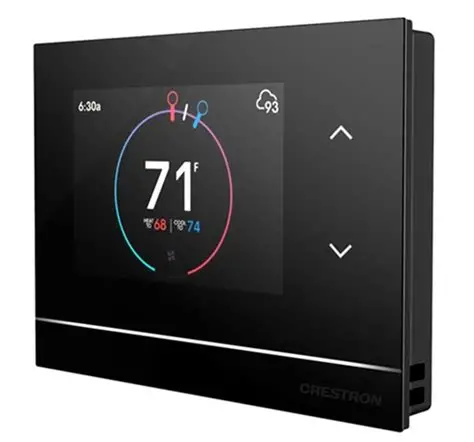
Score: 50/60 | Ideal For: Ultra-high-end custom homes, penthouses, or boutique multi-residential units with a Crestron Home automation system; projects requiring seamless aesthetic and integration across lighting, shades, and climate.
⭐ Overview:
The Crestron Horizon Thermostat (HZ-THSTAT) represents the pinnacle of custom integrator thermostats. Built by Crestron – a leader in luxury home automation – the Horizon thermostat is designed to blend in beautifully with upscale interiors while natively integrating into the Crestron Home® platform for unified control of climate, lighting, security, and beyondcrestron.comcrestron.com. This thermostat features an ultra-slim, minimalist design (just 0.57″ thick) with a high-res 3.5″ color touchscreen and interchangeable black, white, or almond finishes to match Crestron’s designer keypad linecrestron.com. But behind the elegant looks, the Horizon packs serious HVAC prowess: it has an integrated humidistat and can handle advanced HVAC systems like 4-pipe fan coil units, radiant floor heating, and multi-stage heat pumps that are common in larger estates or condoscrestron.comcrestron.com. It communicates via Wi-Fi to the Crestron hub, where programming can allow virtually unlimited integration – e.g. when the thermostat goes into “Away” mode, Crestron can also adjust Lutron shades or activate security. New in this model, Crestron added their Soli radar sensor for ultra-precise occupancy detection and “Dynamic Farsight” display – similar to Nest – which wakes up with info as you approachtheverge.comtheverge.com. And unlike many smart stats, the Horizon doesn’t require batteries (it’s 24V powered but can also work with just 2 wires + a separate 2-wire power bridge, great for retrofits)crestron.comcrestron.com. Essentially, the Crestron Horizon is purpose-built for luxury integration: it’s not meant to be a standalone cloud thermostat, but rather a component of a larger Crestron smart home where it can deliver consistent comfort and coordinate with all other systems. For clients who want completely invisible technology and unified control, the Horizon thermostat is a dream component.
🔧 Key Specs:
- HVAC Compatibility: Extremely versatile. Supports standard 2H/2C conventional HVAC, 4H/2C heat pump systems with 2 aux heat, and even 2-pipe/4-pipe fan coil unit systems (common in condos/hospitality)crestron.com. Also handles radiant floor heating and has built-in humidity control for humidifiers/dehumidifierscrestron.com. Fan control includes multi-speed fan coil support (3-speed).
- Sensors & Display: Local sensors: temperature and humidity (for humidistat function)crestron.com; also an integrated proximity (motion) sensor and ambient light sensor to auto-dim/brighten the displaycrestron.comcrestron.com. Supports up to 4 remote wired temperature sensors and 2 remote temp/humidity sensors for large zonescrestron.com. Display: 3.5″ color LCD touchscreen, high-resolution, with customizable UI (matches Crestron Home app interface for familiarity)crestron.comcrestron.com. A colored LED light bar provides a glanceable status (e.g. blue for cooling, red for heating call)crestron.comcrestron.com.
- Connectivity & Integration: Wi-Fi (802.11 b/g/n) communications to Crestron networkcrestron.comcrestron.com. It is fully integrated into the Crestron Home automation system (setup and control via Crestron Home app); it also can be programmed via Crestron’s SIMPL/Toolbox for custom logic. Matter or other cloud integrations: Not applicable – integration is through the Crestron controller. Voice control is possible by proxy (e.g. you can control it with Alexa or Siri through the Crestron system’s voice integration, not directly). No standalone app – requires Crestron infrastructure.
- Power & Installation: 24VAC powered (requires C-wire). For retrofits with only 2 wires, Crestron offers a 2-wire adapter module to provide power and comm over two conductorscrestron.comcrestron.com. Mounts in a standard single-gang box; extremely low-profile on wall (0.57″). Installation and setup must be done by a Crestron authorized integrator.
- Notable Features: Batch configuration – integrators can configure multiple Horizon thermostats at once via Crestron Toolbox (useful in multi-zone mansions)crestron.comcrestron.com. It can display external data like outdoor temperature and forecast when connected onlinecrestron.com. Fan circulation modes and fan runtime logs are available for enhanced air distribution and maintenance reminderscrestron.comcrestron.com.
🧪 Scoring Breakdown:
- Integration & Interoperability: 8/10 – In the context of a Crestron ecosystem, this is flawless: it becomes a native part of a larger smart home where everything talks to everything. It’s designed for Crestron-only integration, which is both its strength and limitation. It doesn’t speak Matter, Z-Wave, or work without a Crestron controller, so outside that niche it’s not “interoperable” in the usual sense. However, Crestron systems can interface with BACnet, KNX, Lutron, etc., meaning the thermostat indirectly can participate in those integrations via programming. We score it high for closed-loop integration (since target users will have Crestron), but note that it’s not a general plug-and-play device for other platforms.
- HVAC Control Capabilities: 10/10 – Top marks. The Horizon can handle essentially any residential HVAC scenario short of large commercial systems. Multi-stage, multi-zone, complex hydronic/steam or fan-coil setups – all coveredcrestron.com. Few thermostats on the consumer market support 4-pipe FCUs or floor heating control out of the box. Crestron also allows custom HVAC sequences via programming if needed (e.g. controlling motorized dampers, interfacing with VRF/VRV through relays). It’s as capable as many light-commercial BACnet stats, wrapped in a residential-friendly package.
- IAQ Features & Sensors: 7/10 – Good. The thermostat includes a humidity sensor and can directly control humidity and ventilation equipment (via its outputs)crestron.com. It lacks dedicated air quality (VOC/CO₂) sensing – typical for this category – but in a Crestron system you could integrate separate IAQ sensors. The proximity sensor is used mainly for display wake, but could be leveraged in programming for occupancy-based setpoint changes. Overall, solid support for IAQ devices and basic sensing, but no advanced IAQ analytics onboard.
- User Interface & App Experience: 9/10 – For the luxury user, the experience is excellent. The on-wall interface is modern, crisp, and matches the rest of Crestron’s control surfaces in the homecrestron.comcrestron.com. It even offers customizable “faces” and can show an analog clock or weather when idle (similar to Nest’s Farsight)theverge.com. The Crestron Home app provides unified control – the user can adjust HVAC alongside lights, music, etc., in one place, which is a huge convenience. We drop a point only because casual users can’t use this without the full Crestron setup (the app is not thermostat-specific and requires pro commissioning).
- Installation & Expandability: 8/10 – Professional installation is assumed and needed. Within that context, it’s quite installer-friendly (remote sensor options, 2-wire adapter for old homes, Wi-Fi connectivity reduces need for new comm wires)crestron.comcrestron.com. It’s expandable in the sense you can add multiple units for multiple zones and configure them centrally. Also, future expandability is great: if new features roll out in Crestron Home, the thermostat can be updated via firmware. It loses a couple points simply because it’s not a DIY or one-size-fits-all solution – it’s tied to Crestron’s ecosystem for any expansion (which for its market is usually fine).
- Value for Residential/MF Use: 7/10 – The value here is relative to having a Crestron system. The unit cost is high (often around $600+ each, only sold via dealers) and it requires the investment in a Crestron controller and programming. For a residence already planning a six-figure automation system, this thermostat absolutely earns its keep by perfectly integrating and eliminating the need for other climate control interfaces. It also enhances property value in a luxury build by providing that seamless look and feel. However, for a purely energy-savings perspective, less costly smart thermostats could do the job if integration weren’t a concern. So we score value as “good” when deployed in its intended environment (luxury integrated home), but it’s not a mass-market value play.
👍 Pros:
- Seamless Crestron Integration: Instantly joins the Crestron Home system – no fuss. You get one-app control of your entire estate. It can trigger home-wide scenes (“Goodnight” can set back HVAC, turn off lights, arm security, all in one touch). Integration with Crestron means virtually unlimited customization is possible.
- Design & Aesthetics: Ultra-low-profile and available in designer finishes, it matches luxury decor. The screen graphics even switch between light/dark mode and auto-dim to be unobtrusivecrestron.com. There’s a cool RGB status lightbar that adds a subtle high-tech accent and can be programmed for custom indications. This thermostat feels like a part of the house, not a gadget stuck on the wall.
- Robust HVAC Performance: Capable of controlling complex HVAC systems that high-end homes or condos often have (e.g. boiler + chiller 4-pipe systems). The integrated humidistat lets it manage indoor humidity intelligently – Crestron can even automate humidity setpoints based on outside temp to prevent window condensation, etc., all via programming. Also supports fan circulation modes and maintenance reminders which are great for large homescrestron.comcrestron.com.
- Multi-Sensor Flexibility: Ability to use multiple remote sensors means you can hide the thermostat in a closet and just use discrete sensors, or average readings across a large open-plan space. Great for preserving aesthetics (especially if you prefer not to see any thermostats on walls in a minimalist design – Crestron allows that approach).
- No Batteries or Hassle: Powered by HVAC system (with battery backup option). No need to worry about battery changes that some wireless stats or sensors have. And with the optional 2-wire adapter, even older buildings with simple wiring can get this high-tech thermostat without rewiringcrestron.com.
👎 Cons:
- Crestron System Required: This is not a standalone smart thermostat. If you don’t have a Crestron controller/hub, the Horizon thermostat is essentially unusable – it has to be integrated and programmed as part of a larger system. This makes it unsuitable for anyone outside the Crestron ecosystem (and overkill for smaller homes).
- Cost & Accessibility: Only available through Crestron dealers, with professional setup. The cost per unit is many times that of a Nest or ecobee when factoring in programming. For multi-family developers, this would generally only be in ultra-premium units due to cost.
- Limited Direct Voice/App (Non-Crestron): There’s no native app just for the thermostat – you must use the Crestron app. Similarly, you can’t connect it directly to Alexa or Google; you’d have to integrate those through Crestron’s voice modules. End-users expecting a quick Alexa “skill” to add might be confused (though integrators can certainly make voice work via the system).
- Proprietary Approach: While Crestron can interface with other standards, the thermostat itself is not Matter or Z-Wave compatible. If the homeowner ever moves away from Crestron, the thermostat would likely need to be replaced. It’s a long-term commitment piece of the infrastructure.
- Programming Dependent for Advanced Logic: Some features like using occupancy to adjust setpoints, or linking to alarm systems, are not automatic – they require the integrator to set up those rules in programming. In a well-programmed home this is fine, but out-of-box it doesn’t “learn” or do smart scheduling unless told to by Crestron Home algorithms or custom code.
🏁 Bottom Line:
The Crestron Horizon Thermostat is the go-to climate control solution for fully integrated mansions and luxury developments where a Crestron system is the backbone. It’s not about maximizing energy savings or DIY convenience – it’s about delivering an invisible, utterly cohesive user experience in a smart home. When used as intended, it means the homeowner never has to think about separate HVAC controls; comfort just becomes another facet of their automated lifestyle. If you’re an integrator or builder outfitting a residence with Crestron, the Horizon thermostat is almost a no-brainer to ensure the climate control matches the caliber of the rest of the system. Its ability to handle any HVAC scenario and its high-end design make it a perfect fit for the most demanding environments. In summary, for Crestron-centric luxury homes, the Horizon thermostat is in a class of its own – seamlessly unifying comfort with the smart home of your dreams.
🏅 #4: Google Nest Learning Thermostat (4th Gen) – Best Learning & Design
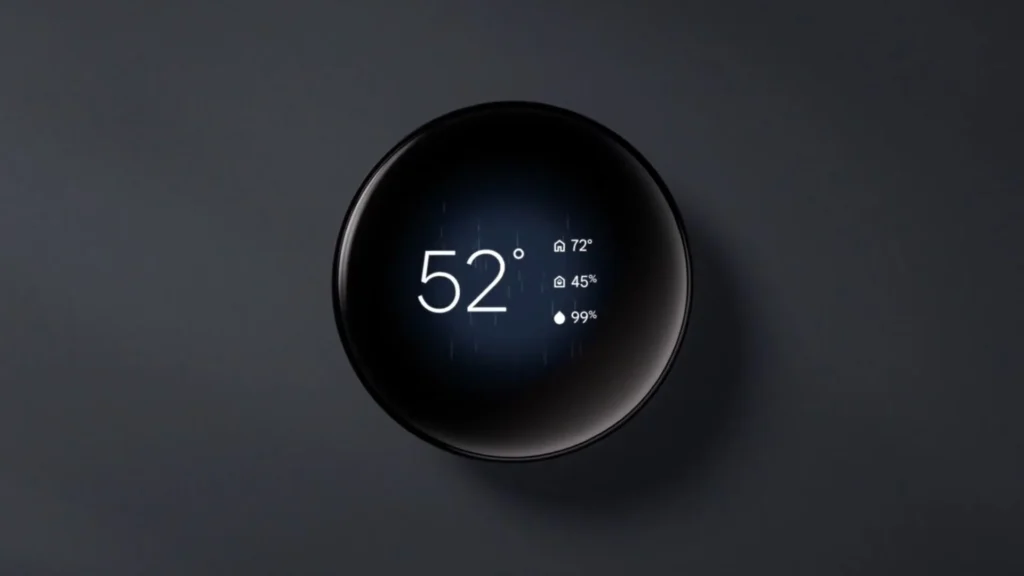
Score: 48/60 | Ideal For: High-end homeowners and condo developers who value sleek design and self-optimizing tech. Great for luxury apartments or homes wanting a stylish centerpiece thermostat with proven energy savings and broad smart home compatibility.
⭐ Overview:
The Nest Learning Thermostat is practically synonymous with “smart thermostat,” and the new 4th Generation (launched late 2024) refreshes this iconic device for modern high-end needstheverge.com. Google has retained Nest’s trademark premium design – a metal ring available in brushed brass, polished black, or stainless steel finishes – and made it even more striking with a larger, higher-resolution display that elegantly illuminates key info as you approach (thanks to built-in Soli radar motion sensing)theverge.comtheverge.com. Nest’s claim to fame is its learning algorithm: instead of manual scheduling, it “learns” your routine and temperature preferences automatically. Over a few weeks of adjustments, Nest will program itself to raise and lower temps based on when you’re home, sleeping, or away – yielding significant energy savings without you thinking about it. The new model uses upgraded AI for faster, more accurate schedule learningtheverge.com. It also still offers features like Auto-Away (uses motion + your phone’s location to avoid heating/cooling an empty home) and Airwave (intelligently cycles the AC fan to reduce compressor run time). In terms of integration, Nest has made a big leap forward: the 4th Gen adds support for the Matter standard and now works natively with Apple HomeKit (via Matter) in addition to Google Assistant and Alexatheverge.comtheverge.com. That’s huge for interoperability – a few years ago Nest was more of a closed ecosystem, but now it’s open to all the major platforms. For multi-family or developers, Nest also offers the advantage of familiarity and a premium perception among buyers/renters – plus there are Nest for Energy/Enterprise programs that allow centralized control of multiple units (useful in apartments). While Nest doesn’t have some advanced IAQ sensors, it does include a humidity sensor and can manage auxiliary HVAC functions like humidifiers. Overall, the Nest Learning Thermostat remains a top-tier choice for style and smarts – especially now that it no longer forces you to choose between Google or Apple ecosystems (it plays nicely with both).
🔧 Key Specs:
- HVAC Compatibility: Supports most 24V systems: up to 3 heat/2 cool conventional, 2H/2C heat pumps (with auxiliary heat). Compatible with dual-fuel (heat pump + furnace) systems. Has connections for common accessory controls (1-stage humidifier or dehumidifier, and fan). It cannot control ventilators/dampers directly, but can coordinate via HVAC fan. Nest also works with high-voltage systems via a relay adapter (sold separately) for retrofits like baseboard heaters.
- Sensors: Built-in temperature, humidity, ambient light, and occupancy/presence sensors. The 4th Gen’s occupancy detection is enhanced by a Soli mmWave radar for more precise motion sensing (it can even detect if someone is near vs far)theverge.com. Also supports the Nest Temperature Sensor (wireless remote sensor, battery-powered) – the 4th Gen now comes bundled with one remote sensor in the boxtheverge.com. Note: the Nest Temperature Sensor provides temperature readings (no motion or humidity in that sensor).
- Connectivity: Wi-Fi (2.4 GHz) to Google Nest cloud. Thread/Matter support – the 4th Gen Nest is Matter-certified over Wi-Fi (no Thread radio in Nest itself)theverge.com. This allows direct integration with Apple Home and others. Works with Google Assistant (of course) and now officially works with Amazon Alexa (via the Google Nest skill). Lacks an open local API, but Matter essentially fills that gap for standard functions.
- Integration & Platform: Native Google Home app control; visible in Apple Home app as a Matter thermostat; Alexa voice control supported. Supports multi-zone setups by using multiple Nest thermostats (each learns its zone). Also integrates with some lighting/security systems via cloud (e.g., Control4 and other integrators have drivers for Nest via the cloud API, though changes post-Google have limited direct third-party integrations). For multifamily, Google offers the Nest for Business platform allowing property managers limited access to control thermostats in vacant units, etc., via a web dashboard (this is a separate enterprise service).
- User Interface: Iconic circular rotating dial control with an HD color display. The UI shows target vs current temp, an analog or digital clock, weather, or time on approach (customizable “Farsight” display)theverge.com. Extremely simple on-device controls – basically turn the ring and press to navigate menus. No touchscreen (the simplicity is intentional). Mobile app (Google Home) for full control and scheduling if needed. The device rings light up and the screen is very visible from across a room when it lights.
- Power & Installation: Requires C-wire for optimal performance (Nest can power-share in some cases without C, but 4th Gen really expects a C-wire for reliability). Installation is straightforward – the base with labeled push connectors makes wiring easy; built-in level for mounting. The trim plate is provided for covering old paint or holes. Nest uses cloud for setup (via scanning a QR in the Home app). The 4th Gen now has a slimmer profile and a slightly larger diameter compared to Gen3, but installation process remains similar.
🧪 Scoring Breakdown:
- Integration & Interoperability: 9/10 – Much improved. With Matter, the Nest Learning Thermostat can finally join heterogeneous smart homes easily – you can tell Siri to adjust it via HomeKit nowtheverge.com. It already worked with Google Assistant and Alexa (Alexa integration has been available via skill). The only thing keeping it from a 10 is the reliance on cloud for some advanced integrations (and no local API outside Matter’s scope). Google has a somewhat locked-down ecosystem for data (no user-accessible API like ecobee’s), but for most users, the Matter + voice assistant support covers integration needs completelytheverge.comtheverge.com.
- HVAC Control Capabilities: 8/10 – Very good for standard residential systems. It handles two-stage cooling and three-stage heating, which covers 95% of high-end home HVAC setups. It can also control one humidifier or dehumidifier if wired, which is a plus for IAQ. Lacks multi-speed fan or ventilator outputs, so not suitable alone for fancier setups like ventilating HRVs (though Nest can be paired with separate controllers). It doesn’t officially support commercial multi-zone systems or fan coil units without workarounds. But for typical high-efficiency furnaces, heat pumps, and ACs found in upscale homes, it’s fully capable. The learning aspect also boosts efficiency of whatever system it’s controlling, which indirectly enhances HVAC performance.
- IAQ Features & Sensors: 6/10 – Average. Nest has a humidity sensor and will display humidity and use it in algorithms (e.g., to activate humidifier or for its Cool to Dry feature that dehumidifies via AC). However, it does not have any air quality (VOC/CO₂) sensing like ecobee Premium. No occupancy sensor in remote temperature sensors (so Nest’s occupancy detection is only from the thermostat’s own motion sensing and your phone’s location). It does integrate with Nest Protect (smoke/CO alarms) to shut off HVAC during an alarm for safety, which is a neat ecosystem perk. Overall, IAQ device control is limited (no direct ventilation control except via running the fan), so Nest falls behind in this category for high-end IAQ-focused projects.
- User Interface & App Experience: 9/10 – The Nest’s interface remains one of the most user-friendly and visually pleasing in the market. The turn-dial and simple menus make it easy for anyone to use at the wall – there’s a reason Nest’s design won awards. The new bigger screen and animated displays (like weather animations) add delight without complexitytheverge.comtheverge.com. The Google Home app is okay – not as specialized as the old Nest app was, and some advanced settings are hidden – but it’s improving and also consolidates all your Google/Nest devices, which is convenient. One minor gripe: Google forces use of the Google Home app (the classic Nest app is being phased out), which some find less intuitive for thermostat scheduling. Still, from a pure UI standpoint, Nest sets a high bar.
- Installation & Expandability: 8/10 – Installing a Nest is relatively simple for a pro or experienced DIYer. The wiring base and setup instructions are excellent. It’s expandable in the sense you can add up to 6 Nest Temperature Sensors per thermostat for averaging different rooms (Note: the sensors only provide temp)ebay.com. If you have multiple HVAC zones, you’ll need multiple Nest thermostats – they don’t directly communicate for zoning beyond each doing their own thing, but the app ties them together logically. One drawback: if no C-wire, the power stealing can cause issues – Google now strongly recommends C-wire use, which in some older homes means an electrician or HVAC tech might need to pull a new wire. As for expandability, Nest integrates with a lot of other Google devices (Protect, speakers for announcements of temp, etc.), but adding functionality beyond its designed features is limited (no external sensor inputs except the official remote sensors).
- Value for Residential/MF Use: 8/10 – The Nest Learning Thermostat is priced at the higher end (the new 4th Gen is about $280 MSRP), but it’s often seen as a value-add in upscale properties. It’s basically a showpiece of smart tech that also reliably yields energy savings ~10-15% (validated by independent studies and Energy Star). For multi-family, having Nest in units can be a marketing plus, and programs exist for bulk management. Google provides excellent support and frequent software updates (the 3rd Gen got ~8 years of updates and still going). The one caution: if a property doesn’t want to rely on tenants using Google accounts, Nest might be tricky in managed scenarios – but Google’s enterprise tools are addressing that. Given the design, brand cachet, and robust performance, Nest offers strong value to homeowners wanting a no-fuss, high-design thermostat – not the absolute most feature-packed, but arguably the best mix of ease and elegance.
👍 Pros:
- Elegant Design & Premium Build: Nest remains the style king of thermostats. The metal finishes and bright, customizable display make it a functional decor element. It automatically lights up when you walk by to show time or temp – a nice touch in luxury settings. Many interior designers prefer Nest for its clean, modern look.
- Learning Intelligence: For busy owners, Nest’s self-programming is a boon. It learns schedules and gradually optimizes heating/cooling without manual inputs. The new AI enhancements mean it adjusts even quicker to changestheverge.com. This “it just figures it out” experience is perfect for those who don’t want to futz with schedules – a selling point in high-end living.
- Energy Track Record: Nest famously documented around 10–12% heating and 15% cooling savings on average. Its features like auto-away, smart scheduling, and gentle time-to-temp transitions genuinely cut down energy use. Utility rebates often specifically list Nest. Over a few years, it can pay back a chunk of its cost via lower bills.
- Improved Integration (Matter): No longer a walled garden – the 4th Gen works with Apple HomeKit (Matter) and Alexa out of the boxtheverge.com. This means a Nest on the wall can still be part of a whole-home scene with your Lutron lights and Sonos speakers via HomeKit or other Matter controllers. It eases any integration concerns for mixed ecosystems.
- Multi-Unit Management: Google’s Nest Renew and enterprise thermostat programs allow grouping thermostats to manage energy demand. For example, property managers can set temp limits in vacant units or cycle HVAC in a large building to reduce peak load. It’s not a full BAS, but it’s more than a standalone device – beneficial in condos or apartments aiming for energy efficiency programs. Also, integration with Google Assistant means building staff or owners can just speak commands for convenience.
👎 Cons:
- No External Sensor Control (aside from Nest’s own): Nest can’t utilize third-party sensors or directly manage external ventilators. If you need something like CO₂-based fresh air vent control, Nest can’t do that (whereas an ecobee could trigger a ventilator if wired). In tightly sealed luxury homes with dedicated ERVs, this could be a limitation.
- Cloud Dependency: Nest is heavily cloud-centric. To use the app or voice, it must be online. An outage of internet (or Google servers) means you fall back to manual control at the device. There’s no local web interface or direct integration with home automation systems except through cloud or Matter. For most, this is fine, but it introduces a point of failure outside one’s control.
- Limited HVAC Outputs: Lacks the extra outputs for advanced IAQ hardware (no dedicated fresh air damper output, only one humidifier OR dehumidifier output). Complex systems might need additional controls alongside Nest, which adds cost/complexity.
- Google Ecosystem Transitions: Google killed the old “Works with Nest” API, which initially hurt integration with some third-party systems. While Matter fixes a lot, some advanced integrations (like custom automations outside of Matter’s scope) are still limited. If a homeowner had older integrations or is not fully in on Google’s ecosystem, there can be an adjustment.
- Potential Learning Overshoots: Some users in the past disliked Nest’s auto-schedule if their schedule is very irregular – it could occasionally make odd adjustments until it learns fully or if patterns change. However, one can turn off auto-learning and use manual scheduling if desired, which mitigates this.
🏁 Bottom Line:
The Nest Learning Thermostat (4th Gen) is back on the podium for 2026 with meaningful updates that make it friendlier to the broader smart home world while retaining the features that made Nest a household name. It’s an ideal choice for high-end residential projects where aesthetics and simplicity are top priorities – the device looks great in a penthouse hallway and doesn’t require explaining a complex UI to the owner. Nest basically popularized the idea that a thermostat can be both beautiful and smart, and its latest iteration keeps it very much in that conversation. For luxury condos, offering a Nest is a tangible upgrade that tech-savvy buyers recognize. For custom homes, if deep integration isn’t needed (or can be handled at the platform level), Nest provides a dependable, polished solution that “just works” and saves energy. Google’s improvements in integration mean it’s unlikely to ever feel out of place, no matter what other tech the homeowner brings into the space. In short, the Nest Learning Thermostat remains a gold standard for design and ease-of-use in climate control – now more open and powerful than ever.
🏅 #5: Control4 Wireless Thermostat (by Aprilaire) – Best for Custom Control4 Systems
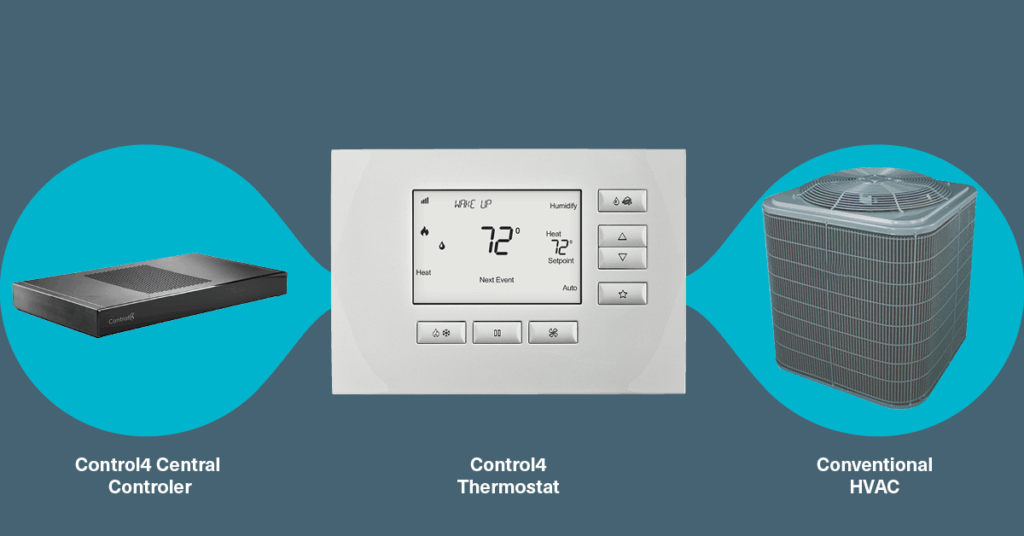
Score: 45/60 | Ideal For: Luxury residences and upscale condos already equipped with a Control4 home automation system (lighting, AV, security) where climate control should tie into the same platform. Great for retrofit integrations and clients who want one app for everything via Control4.
⭐ Overview:
Rounding out our top five is the Control4 Wireless Thermostat, developed in partnership with Aprilaire (model C4-THERM series) specifically for Control4 smart homes. This thermostat is the glue that brings HVAC into the Control4 ecosystem – it communicates over Zigbee to the Control4 controller and allows homeowners to manage temperature from their Control4 touch panels, mobile app, or wall keypads alongside their music, shades, etc. Essentially, it’s a proprietary smart thermostat for Control4, ensuring native integration and reliability. Hardware-wise, the C4 thermostat is based on a proven Aprilaire design: it has a simple backlit LCD display and physical up/down control buttons, with an understated look that matches decora-style switches (available in white). While it’s not flashy, it’s sophisticated under the hood – supporting a wide range of HVAC systems (including heat pumps, dual fuel, multistage, plus humidifier/dehumidifier control)smart-touch.hrsnapav.com. It features advanced adaptive scheduling that can be programmed via Control4’s composer software, and it can run on either 24V C-wire power or battery power for flexibility (e.g., in older homes with 2-wire heat-only systems)listenup.comlistenup.com. One major advantage in a Control4 setup: the thermostat can participate in whole-home scenes. For instance, hitting an “Away” scene on a keypad can set back the HVAC, or a fire alarm event from the security system can shut off the furnace automatically via programming. The Control4 thermostat does not have “learning” algorithms or fancy UI, but that simplicity belies its strength in an integrated environment. And since it’s an official Control4 product, the customer gets one-stop support through their integrator for everything. For luxury projects where Control4 is the platform of choice (a common scenario in high-end production homes and condos), this thermostat keeps climate control in lockstep with the rest of the smart home.
🔧 Key Specs:
- HVAC Compatibility: Handles up to 3H/2C conventional or 4H/2C heat pump configurationssnapav.com. Compatible with forced air, geothermal systems, dual-fuel setups, etc.smart-touch.hr. It also can control humidification and dehumidification equipment, as well as ventilation (it supports an HVAC “EAC” or Fan output usable for fresh air damper in some Aprilaire HVAC setups)snapav.com. In summary, it covers most residential HVAC scenarios.
- Sensors: Built-in temperature sensor, and it reads the HVAC’s status (heat/cool running, fan status) to display on Control4 UI. It also supports connecting one or more wired remote temperature sensors (for averaging or remote location of sensor) – Aprilaire offers optional remote sensor accessories that can tie into it. Lacks modern extras like motion or humidity sensing onboard (it can control humidity if wired to a humidifier, but it doesn’t measure humidity itself – it would need an Aprilaire controller input for that or rely on humidifier’s internal humidistat setting).
- Connectivity: Zigbee (IEEE 802.15.4) mesh communicationlistenup.comlistenup.com. It joins the Control4 Zigbee network in the home. All user control and automation happens through the Control4 controller (or locally at the thermostat). No Wi-Fi or cloud connectivity in the thermostat itself – remote access is via the Control4 system’s network connection. Integration with voice (Alexa, Google) is achieved through Control4’s voice integration – the thermostat will respond to voice commands issued to the Control4 system (e.g., “Alexa, set the house temperature to 72” works if Alexa is connected to Control4).
- User Interface: On-device: Monochrome LCD screen with backlight, showing temperature, mode, setpoint, etc.snapav.com. Push buttons for up/down temperature, mode, fan. The UI is functional but basic (aimed to blend with light switches rather than draw attention). Off-device: Control4 Touch Screens, the Control4 mobile app, or on-screen display on TVs all provide a richer interface to control schedules, setpoints, and see multiple zones. The C4 app can show all thermostats in the project with a nice graphical UI (though not as fancy as Nest’s dial). Scheduling is typically done via the app or programmer (the thermostat itself can hold presets and schedules that the integrator sets up).
- Power & Installation: Can be battery-powered (4x AA) or wired to 24VAC C-wirelistenup.comsnapav.com. If both are provided, batteries act as backup. This flexibility is great for retrofit – it even means you can use it on a 2-wire boiler system without adding a C-wire (just use batteries). Mounts on a standard vertical thermostat sub-base (the form factor is like a traditional thermostat, not a round or square shape). Only installable by/in coordination with a Control4 dealer since it needs to be joined to the Zigbee network and programmed in Composer.
🧪 Scoring Breakdown:
- Integration & Interoperability: 7/10 – Within a Control4 environment, it’s superb: instant, low-latency integration with lighting, AV, etc., and fully exposed to automation programming. But it loses points for being exclusive to Control4 – it doesn’t work with other systems or standalone. There’s no direct API or Matter support. Essentially, it’s as interoperable as your Control4 system is (Control4 can interface with voice assistants and some third-party gear). So for Control4 homes, it’s great; elsewhere, it’s not applicable.
- HVAC Control Capabilities: 9/10 – High marks. It supports advanced multi-stage HVAC and humidity control, matching many pro thermostats in connectivitysnapav.com. It even has an option for ventilation control with the right HVAC equipment. It lacks a few edge-case abilities (no direct multi-speed fan coil control, no built-in support for radiant floor without using it as a conventional thermostat mode). But those scenarios are rare in Control4’s typical market (which is usually luxury residential with standard centralized HVAC). Overall, it can implement efficient schedules and presets that keep homes comfortable under even complex HVAC setupssmart-touch.hr.
- IAQ Features & Sensors: 6/10 – Below average. While it can control IAQ devices (humidifiers, dehumidifiers)snapav.com, it has no internal humidity or air quality sensing. Typically, one would use an external Aprilaire humidistat in tandem, or simply run the humidifier on a schedule or fixed setting via Control4. No occupancy detection or smart recovery features on its own (though Control4 programming could use external motion sensors to mimic occupancy-based setpoint changes). It covers the basics but doesn’t proactively optimize IAQ – that likely needs an integrator’s logic or additional sensors on the Control4 system.
- User Interface & App Experience: 6/10 – On its own, the thermostat’s interface is utilitarian, akin to a standard digital thermostat from 10 years ago (which, in fairness, many clients find perfectly sufficient for occasional on-wall adjustments). The real UI is the Control4 app or touch panel, which provides a decent, if somewhat plain, interface for climate control. It’s not as visually polished or intuitive as Nest or ecobee’s native apps for the thermostat specifically. However, convenience is high if the user is already in the C4 app for everything – they don’t have to switch apps to adjust climate. We score it lower here because the dedicated thermostat UI experience isn’t cutting-edge; it’s the integration that carries it.
- Installation & Expandability: 7/10 – Pros: Very flexible power options, making it viable in retrofits where pulling new wires is a pain (battery power mode). Also, supports multiple thermostats in a mesh network – each one acts as a node (though note, C4 thermostats are not Zigbee repeaters per Control4’s guidancecrestron.com, so you still need other powered Zigbee devices to strengthen the mesh). Expandability is mainly adding more thermostats or sensors; you can’t add things like extra IAQ modules except via separate Aprilaire hardware. It integrates with Control4 sensors easily (e.g., use a door sensor to trigger HVAC off if a door is left open – those kinds of expansions are more about the Control4 system’s abilities). Installation must be done by a Control4 dealer, but they are common in high-end markets. We give it solid marks for retrofit friendliness and multi-zone management ease, minus some points because it’s not DIY/consumer-friendly at all.
- Value for Residential/MF Use: 6/10 – For someone already investing in a Control4 system, the additional cost of the thermostat (~$300-$400 list price) is justified to unify everything. It provides value in convenience and one-stop integration. However, compared to other smart thermostats, it’s expensive for the feature set if viewed in isolation. It also doesn’t have direct energy reports or fancy features to justify itself outside of Control4. In multifamily scenarios, Control4 thermostats might be used in luxury developments that standardize on Control4 for entire units – a premium approach, but one that some high-end condos do use to offer a complete smart home. In that narrow scenario, it’s valuable. But broadly, if someone just wants energy savings and basic smarts, this thermostat wouldn’t be the go-to except for the integration factor. So, value is quite context-dependent – we lean on the lower side since it’s a “must-have” only when Control4 is involved.
👍 Pros:
- Native Control4 Experience: If you have Control4, this thermostat melts into the system. It’s recognized instantly, and you can create automations like “Pause music when HVAC fan turns on” or “Text me if house temp goes out of range” all within the same Composer interface that does your lighting scenes. No adapters or cloud links needed – it’s all local and reliable.
- Reliable and Fast Control: Because it’s Zigbee local, adjusting the temp via app or touch panel is very responsive (no cloud latency). It also means if internet is down, you can still control it through your local Control4 interfaces. This reliability and speed are important in high-end homes where things are expected to “just work” on command.
- Flexible Power/Wiring: The battery-powered option is a big plus in retrofits – for example, replacing an old analog thermostat in a historic brownstone where running new wires is impractical. It will still join the Zigbee network and run up to ~2 years on batteries. This versatility can save a lot on installation labor.
- Advanced HVAC Functions: In partnership with Aprilaire, Control4 ensured this thermostat supports features like dual fuel logic, aux heat lockouts, and humidity control which are vital for high-efficiency HVAC systemslistenup.comsnapav.com. It’s not a “dumbed down” integration – you’re getting near-thermostat-pro level control through C4.
- A Coordinated Aesthetic: While not flashy itself, the thermostat’s neutral design means it doesn’t clash with Control4’s lighting keypads or touchscreens. Many high-end projects use the Aprilaire/Control4 thermostats in utility areas and rely on touchscreens or app for primary control. In other words, you have the freedom to hide the thermostats away (in a closet or mechanical room) using remote sensors, keeping walls clean – the system will still operate fine controlled from touch panels. It’s a pro-centric approach to interior design.
👎 Cons:
- Locked into Control4: This thermostat is essentially useless outside a Control4 system – it won’t function with other hubs or by itself beyond basic HVAC hold (and even initial setup needs C4). If the homeowner later switches platforms or sells the home to someone not using Control4, these thermostats would likely need replacement.
- No Smart Features Onboard: There’s no learning schedule, no occupancy sensing (unless integrated separately), and no voice assistant or fancy display. All “smart” behavior comes from the Control4 controller’s programming. For example, geofencing home/away requires setting up Control4’s When>>Then or 4Sight features, as the thermostat itself has no geofence capability. So it’s as smart as you make it – which can be a con for those expecting plug-and-play intelligence.
- Plain Interface: Compared to others, the lack of a colorful touchscreen or modern graphics can feel dated. It literally shows numbers and mode icons. In a market where even $200 thermostats have gorgeous screens, this might seem underwhelming to end-users (though integrators often mitigate by having clients control via app or touchscreens).
- Integrators Required for Changes: If the homeowner wants to tweak how the thermostat interacts in scenes or adjust advanced settings, they might need to call their dealer unless they have access to Control4’s customer tools. It’s not as DIY-friendly as Nest or ecobee where the user can experiment with settings easily. This can add ongoing service costs.
- Limited Standalone App Functionality: While the Control4 app can adjust temp and modes, it doesn’t provide energy usage history, learning insights, or suggestions the way something like Nest or ecobee’s app might. Those value-added insights (monthly reports, “you used X% more energy”) aren’t part of the experience here.
🏁 Bottom Line:
The Control4 Wireless Thermostat is a specialist product for a specific market – but in that market, it’s indispensable. If you’re building or retrofitting a smart home around Control4, this thermostat is the smoothest way to integrate climate control. It keeps things simple for the user (one app, one point of contact for support) and leverages Control4’s robust automation capabilities to do things standard smart thermostats can’t (multi-system orchestration, custom triggers). However, outside of a Control4-centric project, it wouldn’t make sense – there are more feature-rich or cost-effective options. Therefore, we chiefly recommend the C4 Thermostat to those already committed to Control4 for the broader home automation. In that scenario, its lack of frills is actually a benefit – less to conflict with the unified interface. It’s reliable, effective, and cohesive, aligning perfectly with Control4’s mission of an integrated home. For luxury developments or residences where Control4 is a given, the Wireless Thermostat by Aprilaire is the right tool to ensure heating and cooling join the party seamlessly, keeping residents comfortable and connected.
🧮 Smart Thermostat Comparison Table – 2026 Highlights
| Model | Total Score (60) | Integration & Ecosystems | HVAC/IAQ Control | Unique Strengths | Ideal Use Case |
| 🥇 ecobee SmartThermostat Premium | 56 | Wi-Fi, Alexa Built-in, Siri (HomeKit), Google, SmartThings, API, Thread/Matter-ready | 2H/2C or 4H/2C HP, + humidifier/dehumidifier/ventilator control; IAQ sensor (VOC/CO₂) | All-in-one (thermostat + Alexa), Air quality monitoring & alerts, Robust remote sensor system | Best overall smart thermostat for luxury homes needing maximum integration & IAQ features |
| 🥈 Honeywell Home T10 Pro | 52 | Wi-Fi, Alexa, Google, HomeKit, Resideo App, (Z-Wave model available separately) | 3H/2C HP or 2H/2C conventional, humidifier, dehumidifier, ventilator outputs; RedLINK wireless sensors (temp, humidity, motion) | Professional-grade HVAC support, Multi-room sensing, Local on-device scheduling + cloud | Homes with complex HVAC (multi-stage or dual-fuel) and those wanting pro-installed reliability with consumer-friendly app |
| 🥉 Crestron Horizon Thermostat | 50 | Wi-Fi to Crestron; integrates with Crestron Home (Alexa/Google via Crestron) | 4H/2C HP, 4-pipe FCU, radiant floor, humidity control; supports wired remote sensors | Luxurious design (slim, customizable), Native Crestron integration, Advanced HVAC compatibility (incl. fan-coils) | Ultra-high-end homes with Crestron automation systems where aesthetics and deep integration trump standalone smarts |
| 🏅 Nest Learning Thermostat (4th Gen) | 48 | Wi-Fi, Google Assistant, Alexa, Matter (Apple Home); Google Home app | 3H/2C conventional or 2H/2C HP; accessory (1 humidifier or dehumidifier); remote temp sensors | Self-learning schedules, Iconic design & dial UI, New radar for presence; energy reports | Design-conscious users and condos; also anyone wanting a proven learn-by-itself thermostat now with universal ecosystem support |
| 🏅 Control4 Wireless Thermostat | 45 | Zigbee (Proprietary to Control4); Control4 Composer programming (Alexa/Google via Control4) | 3H/2C conventional or 4H/2C HP, humidifier/dehumidifier, HVAC fan & presets; no internal IAQ sensors | Seamless Control4 smart home tie-in, Battery operation option, Presets & schedules via Control4 scenes | Residences with Control4 systems, enabling unified climate, lighting, and AV scenes managed by a professional integrator |
🧭 Which Smart Thermostat Is Right for High-End Residential or Multifamily?
Choosing the “best” smart thermostat for a luxury home or development really comes down to integration priorities and project context:
- If you want broad compatibility and rich features out-of-the-box: an Ecobee SmartThermostat Premium is hard to beat. It’s ideal for homeowners who use multiple smart platforms (Apple Home, Alexa, etc.) or who value indoor air quality insights. Ecobee will give you maximum flexibility – it can slot into a HomeKit house or a SmartThings setup, or just operate standalone with its excellent app. For high-end residences aiming for wellness and efficiency, ecobee’s built-in VOC/CO₂ monitoring and occupancy-based optimizations are a big plus. And unlike proprietary systems, any tech-savvy resident or facility manager can work with its open ecosystem (or tap into its API for custom integrations). Choose ecobee for a feature-rich, universally compatible solution that won’t lock you in – great for individual luxury homes or condo units where the owner may personalize their smart home gadgets.
- If your focus is on advanced HVAC equipment and pro installation: look at the Honeywell Home T10 Pro. This thermostat shines in residences with complex climate control needs – large estates with multi-stage HVAC, separate dehumidifiers, wine room cooling units, etc. The T10 is often the top pick of HVAC contractors for high-end jobs because it covers all the bases on the equipment side (and it’s backed by Honeywell’s reliability). It also integrates nicely with voice assistants and can be linked into systems like Lutron RA3 or Alarm.com for broader smart home control, making it a versatile middle-ground. For multi-family developers, a T10 (or its cousin, the Honeywell T9 for retail) can be a wise choice if you plan to integrate with property management systems or simply want a dependable, easy-to-use thermostat for new upscale units. The learning curve for residents is minimal, yet they get modern app control and energy benefits.
- If you have a full-fledged Crestron smart home system (or plan to): the Crestron Horizon Thermostat is purpose-built for you. In a sprawling custom home with a Crestron backbone, using the Horizon thermostat in each zone means the homeowner experiences one coherent interface for everything. The HVAC contractor will also appreciate that it can interface with intensive systems (geothermal heat pumps, radiant slabs, etc.) that might be present in luxury homescrestron.com. However, outside of a Crestron environment, it’s not recommended – the investment only makes sense as part of that whole-home package. So, opt for Crestron’s thermostat if top-tier integration and interior design consistency are paramount, and you’re already investing in Crestron for automation, lighting, and AV. It elevates climate control from a standalone utility to an integrated, orchestrated aspect of the smart home.
- If you love the Nest design/brand or need a self-programming device: the Nest Learning Thermostat (4th Gen) is now a very attractive choice even for high-end installations. It used to be that Nest was a bit isolated (great with Google, middling elsewhere), but with Matter and thread support, it has broken free of that limitationtheverge.comtheverge.com. This means you can confidently install Nest in a luxury home that maybe uses Savant or Lutron as the primary system – Nest can still be integrated via Matter or simply run alongside without issue. Nest’s strength is the set-it-and-forget-it intelligence: busy clients might never manually touch their schedule – the Nest adapts to their lifestyle over a few weeks and keeps saving energy in the background. In upscale apartments or condos, providing Nests can also reduce energy costs in common utility arrangements (and management can use services to get insights across units). If the client puts a premium on aesthetics and simplicity, Nest remains a top contender. Just be aware: in a heavily custom integrator-driven home, the integrator might prefer Ecobee or Honeywell due to more direct integrations – but now that Nest speaks Matter, it’s mostly on par for basic integration needs.
- If your project centers on a Control4 automation system: stick with the Control4 Wireless Thermostat for a seamless result. In high-rise luxury condos that come pre-loaded with Control4 for lighting and shades, using the C4 thermostat allows residents to manage HVAC from the same keypad on the wall or the same app on their phone. It’s about delivering a turnkey luxury experience – the client doesn’t have to juggle multiple apps or worry about systems “talking” to each other, because Control4 ties it all together. However, if your project does not have Control4 as a standard, this thermostat is not the appropriate choice – a Nest or Ecobee would offer more standalone benefits to end-users. So, choose the Control4 thermostat only in scenarios where a professional Control4 installation is in play and you want that unified ecosystem for climate, likely because you value the simplicity for the homeowner and the single-point-of-support model (the integrator handles everything, including HVAC control, under one umbrella).
- What about KNX or BACnet systems? In some high-end international projects or very large residences, you might be using KNX for integrated building control or a central BACnet BMS for multiple condos or a hotel-like residence. In those cases, you’d typically use thermostats or room controllers specific to those protocols – e.g., a KNX-enabled thermostat from Basalte, Gira or ABB (which often double as elegant room control panels), or a BACnet wall sensor from the likes of Delta or Johnson Controls. These weren’t in our top-five because they are less common in the U.S. luxury residential market and tend to require specialized integration. But if your project is leaning that way, know that the priorities shift – you’d be focusing on wired bus connectivity and central management. For instance, a Basalte Deseo KNX thermostat is a piece of wall art with multi-touch controls for climate, music, lights in one – perfect for ultramodern minimalistic homes, albeit at a high price and integration effortsmart-touch.hrsmart-touch.hr. Or a BACnet-integrated thermostat (like Schneider Electric’s SE8000 series) might make sense in a high-rise multifamily where each unit’s thermostat reports to a central BMS for energy monitoringvoomisupply.com. The key is: if you’re using KNX/BACnet, you likely have an integrator or engineer designing that system and they will choose a thermostat that fits the bus network and aesthetic requirements. Those are highly project-specific decisions – for example, KNX offers beautiful thermostats that can match any decor but require a KNX programmer to set up. Be sure to involve your MEP consultants and system integrators early if considering these routes.
In summary, residential contractors and developers should weigh how much they need the thermostat to be a team player in a larger system versus a standalone genius.
- For fully integrated smart homes, stick with the thermostat that matches your system (Crestron with Crestron, Control4 with Control4, etc.) so you get rock-solid synchronization and a single unified interface for the homeowner. The slight trade-offs in standalone “smarts” are usually outweighed by the seamless user experience in those environments.
- For stand-alone smart upgrades or loosely integrated setups, Ecobee and Nest are the top dogs – Ecobee for maximum features and platform freedom, Nest for design and hands-off intelligence. Honeywell T10 sits somewhat in between, leaning more to pro-install and HVAC performance, which makes it ideal in new construction or reno projects where HVAC complexity is high but you still want end-user simplicity.
Lastly, always consider the end-user’s comfort with technology. A thermostat can only save energy or improve comfort if the user finds it easy to use. High-end doesn’t have to mean high learning curve – the best choice is one that the homeowner (or building maintenance team) feels confident interacting with, be that through a touch screen, an app, or not at all (because it’s doing the work for them in the background). Fortunately, the 2026 crop of smart thermostats – including our top five – offer options that suit just about every preference, from the completely automated Nest approach to the highly customizable integrator systems.
By aligning the thermostat choice with the overall smart home strategy and the lifestyle needs of the occupants, you’ll ensure the climate control system is an upgrade that delivers both luxurious comfort and tangible efficiency for years to come. Enjoy the future of comfortable living – a home that is not only intelligent and connected, but truly in tune with its inhabitants and environment.